Claude Code VPS Hosting vs Local Development: Which Is Better for Developers?

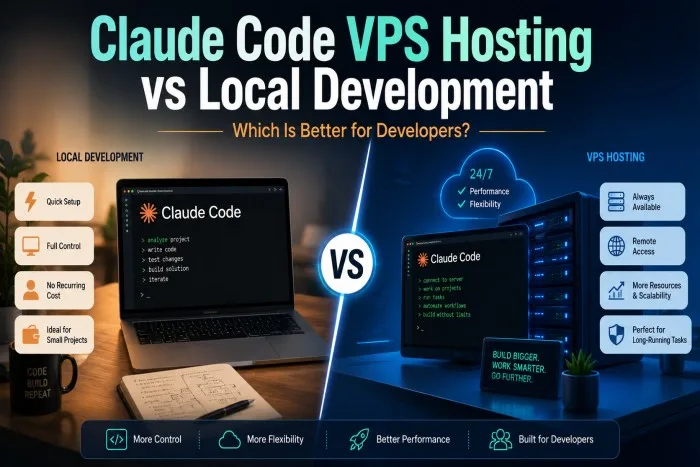
AI-powered coding tools are changing how developers build, test, debug, and maintain software. Claude Code is designed for terminal-based development workflows, allowing developers to work with project files, edit code, execute shell commands, and repeatedly test or verify changes.
One important decision, however, is where to run Claude Code. Developers can use it directly on a local computer or run it within a virtual private server (VPS). Both approaches have advantages, and the better option depends on the type of projects, workload, collaboration, and level of control required.
What Is Local Development with Claude Code?
Local development means installing and running Claude Code directly on your laptop or desktop computer. Your source code, development tools, dependencies, terminal, and other project resources remain on your machine.
This approach is familiar to most developers. You can open your editor, access your local repository, run Claude Code from the terminal, and immediately see changes in your development environment.
Local development can be particularly useful for:
- Small and personal projects
- Short coding sessions
- Offline development tasks that do not require external services
- Developers who prefer working entirely from one computer
- Projects that do not require long-running processes
The biggest advantage is simplicity. There is no separate server to configure or maintain, and developers can work directly with the hardware they already own.
What Is Claude Code VPS Hosting?
A VPS provides a remote virtual server where developers can install their development tools, repositories, dependencies, and applications. Instead of relying entirely on the resources of a laptop, Claude Code can work inside an always-available server environment.
A VPS can provide dedicated virtual resources, remote access, persistent sessions, and greater control over the development environment. This can be particularly useful for workflows involving long-running builds, automated testing, background jobs, or multiple projects.
Some self-managed VPS environments also provide root access, allowing developers to install and configure tools according to their requirements.
Claude Code VPS vs Local Development: Key Differences
The biggest differences involve accessibility, persistence, resources, maintenance, and flexibility.
| Feature | Local Development | VPS Development |
|---|---|---|
| Setup | Usually straightforward | Requires server configuration |
| Accessibility | Primarily tied to your computer | Accessible remotely |
| Persistent environment | Limited by local device availability | Designed for continuous availability |
| Hardware resources | Depends on your computer | Based on selected VPS resources |
| Maintenance | Managed by the developer | Developer manages the VPS |
| Remote access | Requires additional setup | Built around remote access |
| Long-running tasks | Can consume local resources | Can run independently of your laptop |
| Collaboration | More device-dependent | Easier to create a shared environment |
| Control | Full control of local machine | Full control with self-managed VPS |
| Cost | Uses existing hardware | Requires hosting subscription |
1. Performance and Available Resources
Your computer determines how much CPU, RAM, storage, and other resources are available when running Claude Code locally. If you are using a powerful workstation, this may not be a major concern.
However, developers working on resource-intensive projects may prefer separating development workloads from their everyday computer.
A VPS lets you select a server configuration based on your requirements. For example, current VPS options designed for Claude Code can range from smaller configurations for lightweight development to higher-resource plans for larger projects, multiple containers, and heavier workloads.
2. Persistence and Long-Running Tasks
Persistence is one of the strongest arguments for using a VPS.
A laptop can sleep, restart, lose its internet connection, or simply be needed for another task. A remote VPS can continue running independently of whether your personal computer remains connected.
This makes VPS hosting useful for tasks such as:
- Long-running builds
- Automated tests
- Background scripts
- Scheduled development jobs
- Large refactoring tasks
- Continuous debugging
- Data-processing workflows
Developers can disconnect from the server and reconnect later without necessarily having to recreate the entire environment.
3. Mobility and Remote Access
Local development works best when you have access to your primary computer. If your laptop is unavailable, your development environment may be difficult to access.
A VPS changes this model. Developers can connect remotely using SSH from different computers or locations, provided they have the necessary credentials and network access.
For developers who frequently move between a home computer, office workstation, and laptop, having a centralized development environment can be convenient.
4. Control Over the Development Environment
Both approaches can offer significant control, but the type of control is different.
With local development, you control the operating system, installed applications, hardware, networking, and files on your computer.
With a self-managed VPS, you can typically control the server’s operating system, packages, services, configurations, and development stack. Some VPS environments provide full root access, allowing developers to install tools such as Node.js, Python, Docker, Go, or Rust according to project requirements.
For developers who need a highly customized Linux environment, a VPS can therefore provide a useful alternative to local development.
5. Keeping Your Laptop Free for Other Work
Running development tools, databases, containers, builds, and AI-assisted coding processes can consume local CPU, memory, and storage.
This can become inconvenient if your computer is also used for video calls, design applications, browsing, documentation, or other demanding tasks.
Moving selected workloads to a VPS allows the local machine to remain focused on everyday activities while the remote server handles development processes.
6. Collaboration and Team Workflows
Local development environments can vary significantly between team members. Different operating systems, package versions, configurations, and dependencies can create the familiar “works on my machine” problem.
A shared VPS environment can provide a more consistent baseline for a development team. Repositories, dependencies, command-line tools, and configurations can be maintained in one controlled environment.
This does not eliminate the need for good version control and security practices, but it can make certain team workflows easier to standardize.
7. Security Considerations
Security needs careful attention in both environments.
With local development, developers are responsible for protecting their computer, accounts, repositories, credentials, and installed software.
A VPS introduces another layer of responsibility. Developers need to manage server access, SSH keys, operating-system updates, firewall rules, application permissions, secrets, backups, and other security controls.
A self-managed VPS therefore provides flexibility but also requires technical responsibility. Developers should never assume that simply moving code to a VPS automatically makes it more secure.
8. Cost Comparison
Local development can appear less expensive because there is no additional hosting subscription. If you already own a capable computer, you can use your existing hardware.
However, hardware has its own costs. Developers may eventually need more RAM, storage, processing power, or a new workstation.
A VPS converts some of those hardware requirements into a recurring hosting expense. Entry-level VPS plans can be relatively inexpensive, while larger configurations cost more as CPU, RAM, and storage requirements increase.
The right choice depends on whether the convenience and flexibility of remote infrastructure justify the additional monthly cost.
Where Does Bluehost Fit In?
Bluehost offers self-managed VPS environments specifically positioned for Claude Code workflows, with features such as NVMe storage, KVM isolation, full root access, persistent server environments, and multiple VPS configurations. Its current plans range from smaller development environments to higher-resource options intended for heavier AI workloads.
The important point is that the VPS itself provides the infrastructure; developers still need appropriate Claude Code access and authentication separately.
When Should You Choose Local Development?
Local development is usually the better choice when:
- You primarily work on small projects.
- Your computer has sufficient resources.
- You prefer a simple development setup.
- You rarely need long-running processes.
- You do not need remote access to your environment.
- You are comfortable keeping everything on one machine.
- You want to avoid recurring VPS costs.
For individual developers and learners, local development can be an excellent starting point.
When Should You Choose a VPS?
A VPS becomes more attractive when:
- You need an environment that remains available when your laptop is offline.
- You regularly run long-running development tasks.
- Your local machine has limited resources.
- You need remote access to the same development environment.
- You manage multiple projects.
- You want a consistent environment for a small team.
- You need greater control over server-side configurations.
- You want to separate development workloads from your personal computer.
A VPS can be especially useful for developers using Claude Code as part of continuous, iterative workflows involving code changes, commands, testing, and automation.
Can You Use Both?
Absolutely. The choice does not have to be either-or.
Many developers can benefit from a hybrid approach. Local development can be used for everyday coding, editing, debugging, and quick experiments, while a VPS can handle longer-running processes, remote environments, automated tasks, staging applications, or resource-intensive workflows.
For example, a developer could write and review code locally, push changes to a repository, and then use a remote VPS environment for extended testing or deployment-related tasks.
This approach combines the convenience of local development with the persistence and remote accessibility of VPS infrastructure.
Final Verdict: VPS or Local Development?
There is no universal winner between Claude Code VPS hosting and local development.
Local development is generally better for simplicity, convenience, and personal projects. It allows developers to work directly on their own computers without managing another server.
VPS hosting is better suited to persistent, remote, scalable, and long-running development workflows. It can provide an always-available environment with dedicated virtual resources and greater server-level control.
For developers who primarily write code for a few hours at a time, a capable local machine may be all they need. For developers building larger applications, running automated workflows, managing multiple projects, or wanting Claude Code to operate independently of their laptop, a VPS can be the more flexible solution.
Ultimately, the best environment is the one that matches your workflow. Start locally if simplicity is your priority, and consider moving selected workloads to a VPS as your projects and development requirements grow.